> ## Documentation Index
> Fetch the complete documentation index at: https://docs.searchable.com/llms.txt
> Use this file to discover all available pages before exploring further.
# Working with Prompts
> Master the art of creating and managing prompts to track your AI visibility
## What Are Prompts?
Prompts are questions or queries that you want to track across AI platforms. Think of them as the "keywords" of AI search - they help you understand when and how AI models mention your brand.
While Search Engines like Google operate primarily on short phrases, or "keywords", AI search is much more conversational in nature. While you may search for 'best running sneakers' on Google, AI search will provide better answers for queries such as 'best road running sneakers on a budget, ideally waterproof'.
## Why Prompts Matter
### The AI Search Shift
Users are increasingly asking AI assistants for recommendations:
* "What's the best CRM for small businesses?"
* "How do I optimize my website for SEO?"
* "How can I introduce more colours to my decor?"
If your brand isn't mentioned in these AI responses, you're invisible to potential customers.
### What We Track
Searchable monitors your prompts across major AI platforms:
ChatGPT
Claude (Opus, Sonnet, Haiku)
Gemini (Pro, Ultra)
Perplexity AI
xAI Grok, DeepSeek, Meta Llama
## Creating Effective Prompts
### Prompt Anatomy
A great prompt has three components:
1. **Context**: Who is asking and what's their situation?
2. **Intent**: What information are they seeking?
3. **Specificity**: Enough detail to generate useful responses
### Good vs. Bad Prompts
```text Bad Prompt theme={null}
CRM software
```
```text Good Prompt theme={null}
What are the best CRM software options for a small business with 10-20 employees that integrates with email marketing?
```
**Why the difference?**
* Bad: Too vague, will generate generic lists
* Good: Specific context, clear intent, qualified criteria
Reusing your SEO keywords as prompts is not a good AEO strategy.
### Prompt Templates by Industry
**Product Comparison**
```text theme={null}
What are the best [your category] tools for [target audience]
who need [key feature]?
```
**Problem-Solution**
```text theme={null}
How can [target audience] solve [specific problem]
without [common pain point]?
```
**Feature Inquiry**
```text theme={null}
Which [product category] offers [specific feature]
and integrates with [popular tool]?
```
**Product Recommendations**
```text theme={null}
What's the best [product type] for [use case]
under [price range]?
```
**Buying Guides**
```text theme={null}
What should I look for when buying [product category]
for [specific need]?
```
**Alternative Seeking**
```text theme={null}
What are good alternatives to [competitor]
that are [better/cheaper/more feature-rich]?
```
**Service Provider Selection**
```text theme={null}
How do I choose the right [service type] for [specific situation]?
```
**Local Queries**
```text theme={null}
Who are the top [service providers] in [location]
for [specific service]?
```
**Qualification Questions**
```text theme={null}
What questions should I ask when hiring a [service professional]?
```
**Resource Discovery**
```text theme={null}
What are the best resources for learning [topic]
at [skill level]?
```
**Content Recommendations**
```text theme={null}
Can you recommend [content type] about [topic]
that covers [specific aspect]?
```
**Comparison Content**
```text theme={null}
What's the difference between [concept A] and [concept B]
in [context]?
```
## Prompt Strategy
### The Prompt Pyramid
Build your prompt library strategically:
Direct mentions of your brand name
**Examples:**
* "What is \[Your Brand]?"
* "Tell me about \[Your Company]"
* "How does \[Your Product] work?"
**Purpose**: Establish baseline brand awareness
Your product/service category without brand name
**Examples:**
* "What are the best \[category] for \[audience]?"
* "How do I choose a \[category]?"
* "What features should I look for in \[category]?"
**Purpose**: Compete for category dominance
Problems your product solves, without mentioning solutions
**Examples:**
* "How can I \[achieve goal]?"
* "What's the best way to \[solve problem]?"
* "I'm struggling with \[pain point], what should I do?"
**Purpose**: Capture users before they know solutions exist
Related topics where your brand adds value
**Examples:**
* "What is \[related concept]?"
* "How do \[adjacent process] work?"
* "Best practices for \[related activity]?"
**Purpose**: Build topic authority beyond your core offering
### Prompt Diversity
Balance your prompts across dimensions:
| Dimension | Why It Matters | Example Balance |
| ----------------------- | ---------------------------------------------------------------- | ---------------------------------------------- |
| **Specificity** | Broad prompts show awareness, specific ones show purchase intent | 40% broad, 60% specific |
| **Buying Stage** | Track the full customer journey | 30% awareness, 40% consideration, 30% decision |
| **Competitor Mentions** | Understand your competitive position | 20% include competitor names |
| **Question Types** | Different formats appeal to different users | Mix "what", "how", "why", "which" |
## Managing Your Prompt Library
### In the Searchable Dashboard
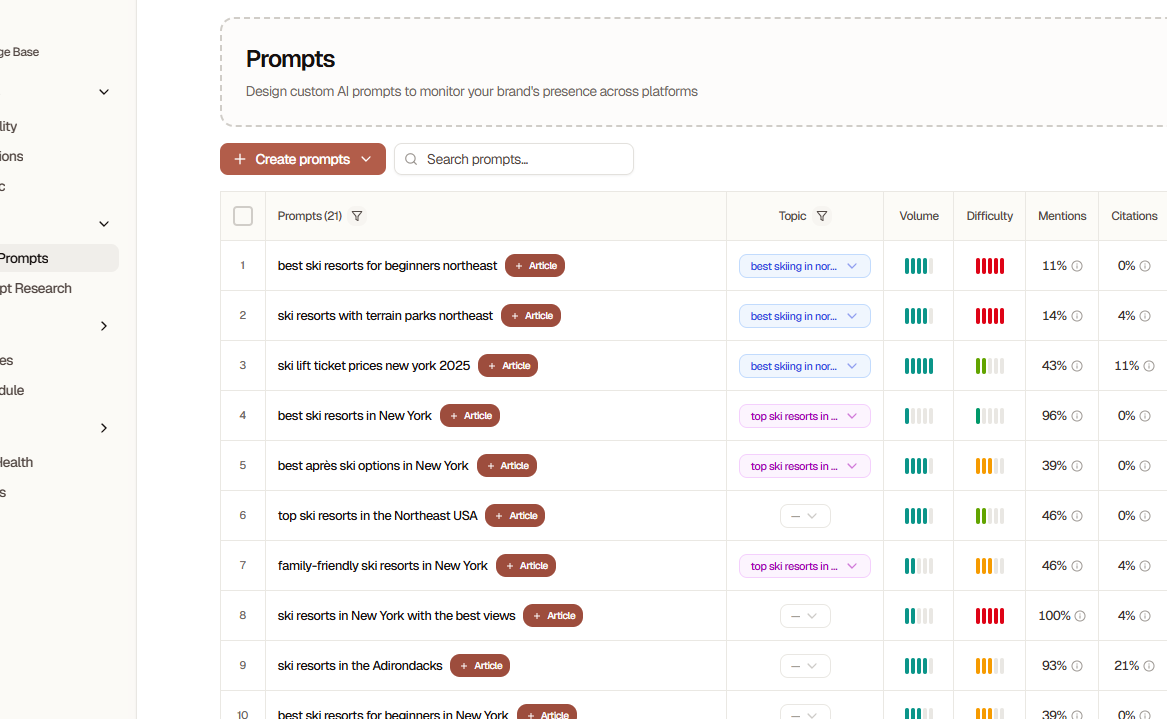 **Actions Available:**
* Create new prompts
* Edit existing prompts
* Archive low-performing prompts
* Bulk import/export
* Analyze performance
* View mention history
### Creating a Prompt
Go to **Prompts** tab in your project
Click the **"+ New Prompt"** button
Type your prompt exactly as a user would ask it
Test your prompt in ChatGPT or another AI platform first to see what kinds of responses it generates.
* **Category**: Organize prompts by type
* **Priority**: Mark important prompts
* **Tags**: Add labels for filtering
Click **"Save & Run"** to immediately test across all AI platforms
Initial results appear within 30-60 seconds. Historical tracking begins immediately.
### Bulk Import
For adding many prompts at once:
1. **Download Template**
* Go to Prompts → **Import**
* Download the CSV template
2. **Fill Template**
* One prompt per row
* Include category and tags columns
* Maximum 1000 prompts per import
```csv Example: prompts-import.csv theme={null}
prompt,category,tags,priority
"What are the best CRM tools for startups?",Product Comparison,"crm,startup,comparison",High
"How do I automate my email marketing?",Problem Solution,"email,automation,how-to",Medium
"What is [Your Brand]?",Brand Query,"brand,awareness",High
```
3. **Upload & Review**
* Upload your CSV file
* Review detected prompts
* Fix any errors
* Click **"Import All"**
### Prompt Templates
Save time with pre-built templates:
**Access Templates:**
* Go to Prompts → **Templates**
* Browse by industry or use case
* Click **"Use Template"**
* Customize for your brand
**Available Template Categories:**
* SaaS Product Queries
* E-commerce Product Recommendations
* Service Provider Selection
* Content Discovery
* Local Business Queries
* B2B Software Evaluation
## Analyzing Prompt Performance
### Key Metrics
How often your brand appears in responses
Where you rank when mentioned (1-10)
Your mentions vs. total category mentions
Positive, neutral, or negative mentions
### Interpreting Results
**High Performers (80%+ mention rate)**
* Great! These prompts consistently mention your brand
* Action: Create similar prompts to expand this success
**Medium Performers (30-79% mention rate)**
* Promising opportunities for improvement
* Action: Optimize content to better match these prompts
**Low Performers (below 30% mention rate)**
* Either too competitive or need better content alignment
* Action: Create targeted content or refine prompt wording
**Zero Mentions**
* Not necessarily bad - could be opportunity queries
* Action: Create comprehensive content specifically for these prompts
### Prompt Optimization Cycle
Let prompts collect data across multiple AI platforms
Identify which prompts generate mentions and which don't
Write articles targeting zero-mention prompts
Improve pages that get partial mentions to increase frequency
Create new prompts based on what's working
Continuous optimization is key to AI visibility
## Advanced Prompt Techniques
### Competitor Tracking
Include competitors in your prompts to understand your position:
**Comparison Prompts:**
```text theme={null}
What's better: [Your Brand] or [Competitor]?
Compare [Your Brand] vs [Competitor] for [use case]
[Your Brand] alternatives that are [better criterion]
```
**Market Landscape:**
```text theme={null}
What are the top 5 [category] tools?
Who are the leaders in [industry]?
What are the best [category] companies?
```
### Sentiment Analysis
Track not just mentions, but how you're mentioned:
* Monitor positive vs. negative sentiment
* Identify common criticisms
* Track feature-specific sentiment
* Compare sentiment to competitors
### Time-Based Prompts
Some prompts are seasonal or time-sensitive:
**Examples:**
```text theme={null}
Best [product] for 2025
Top [category] tools this year
Latest trends in [industry]
```
**Strategy:**
* Create year-specific prompts
* Update annually
* Archive outdated versions
### Local Prompts
For location-based businesses:
**Examples:**
```text theme={null}
Best [service] in [city]
Top [business type] near [location]
Where to find [product] in [area]
```
## Prompt Best Practices
Start with 10-20 prompts and expand gradually
Test prompts in ChatGPT before adding to Searchable
Focus on questions your customers actually ask
Include competitor names strategically
Update prompts quarterly to stay current
Archive low-performing prompts after 3 months
Create content specifically targeting zero-mention prompts
Avoid "gaming" the system by creating prompts that are too specific to your brand. Focus on genuine user queries for meaningful insights.
## Industry-Specific Strategies
### SaaS
* Focus heavily on feature comparison prompts
* Track integration-related queries
* Monitor pricing and plan comparisons
* Include use-case specific prompts
### E-commerce
* Product recommendation prompts
* Price-point specific queries
* Alternative and comparison prompts
* Seasonal buying queries
### Services
* Problem-solution prompts
* Qualification and vetting questions
* Local service queries
* Industry-specific how-to prompts
### Content/Publishing
* Resource discovery prompts
* Learning and education queries
* "Best of" list prompts
* Tutorial and guide requests
## Frequently Asked Questions
* Start with 10-20 prompts and expand based on performance
* Most businesses find 50-200 prompts sufficient for comprehensive coverage
* Quality matters more than quantity - focus on prompts your customers actually ask
* **Add new prompts**: Monthly
* **Review performance**: Weekly
* **Update existing prompts**: Quarterly
* **Archive low performers**: Every 3 months
Prompt strategy should evolve with your business and market.
Yes! Overly specific prompts (e.g., "Tell me everything about \[Your Brand]'s exact feature set") won't reflect real user queries. Balance specificity with natural language.
Common reasons:
* Your brand isn't well-known enough yet
* No content specifically answers that prompt
* The prompt is too competitive
* AI models lack training data about your brand
**Solution**: Create comprehensive content targeting those prompts and build brand authority.
Yes, strategically! Including competitors helps you:
* Understand your competitive position
* Identify where you're being compared
* Find alternative-seeking queries
Aim for 20-30% of prompts to include competitor names.
Custom plans support multi-language prompts. Contact sales for:
* Language-specific prompt libraries
* Region-specific AI model tracking
* International brand visibility monitoring
## Prompt Library Resources
Industry-specific prompt templates
AI-powered prompt suggestions
Connect with other users and share prompts
## Next Steps
Create your first prompt now
Learn to interpret visibility reports
Create content that gets AI citations
Master advanced prompt strategies
**Actions Available:**
* Create new prompts
* Edit existing prompts
* Archive low-performing prompts
* Bulk import/export
* Analyze performance
* View mention history
### Creating a Prompt
Go to **Prompts** tab in your project
Click the **"+ New Prompt"** button
Type your prompt exactly as a user would ask it
Test your prompt in ChatGPT or another AI platform first to see what kinds of responses it generates.
* **Category**: Organize prompts by type
* **Priority**: Mark important prompts
* **Tags**: Add labels for filtering
Click **"Save & Run"** to immediately test across all AI platforms
Initial results appear within 30-60 seconds. Historical tracking begins immediately.
### Bulk Import
For adding many prompts at once:
1. **Download Template**
* Go to Prompts → **Import**
* Download the CSV template
2. **Fill Template**
* One prompt per row
* Include category and tags columns
* Maximum 1000 prompts per import
```csv Example: prompts-import.csv theme={null}
prompt,category,tags,priority
"What are the best CRM tools for startups?",Product Comparison,"crm,startup,comparison",High
"How do I automate my email marketing?",Problem Solution,"email,automation,how-to",Medium
"What is [Your Brand]?",Brand Query,"brand,awareness",High
```
3. **Upload & Review**
* Upload your CSV file
* Review detected prompts
* Fix any errors
* Click **"Import All"**
### Prompt Templates
Save time with pre-built templates:
**Access Templates:**
* Go to Prompts → **Templates**
* Browse by industry or use case
* Click **"Use Template"**
* Customize for your brand
**Available Template Categories:**
* SaaS Product Queries
* E-commerce Product Recommendations
* Service Provider Selection
* Content Discovery
* Local Business Queries
* B2B Software Evaluation
## Analyzing Prompt Performance
### Key Metrics
How often your brand appears in responses
Where you rank when mentioned (1-10)
Your mentions vs. total category mentions
Positive, neutral, or negative mentions
### Interpreting Results
**High Performers (80%+ mention rate)**
* Great! These prompts consistently mention your brand
* Action: Create similar prompts to expand this success
**Medium Performers (30-79% mention rate)**
* Promising opportunities for improvement
* Action: Optimize content to better match these prompts
**Low Performers (below 30% mention rate)**
* Either too competitive or need better content alignment
* Action: Create targeted content or refine prompt wording
**Zero Mentions**
* Not necessarily bad - could be opportunity queries
* Action: Create comprehensive content specifically for these prompts
### Prompt Optimization Cycle
Let prompts collect data across multiple AI platforms
Identify which prompts generate mentions and which don't
Write articles targeting zero-mention prompts
Improve pages that get partial mentions to increase frequency
Create new prompts based on what's working
Continuous optimization is key to AI visibility
## Advanced Prompt Techniques
### Competitor Tracking
Include competitors in your prompts to understand your position:
**Comparison Prompts:**
```text theme={null}
What's better: [Your Brand] or [Competitor]?
Compare [Your Brand] vs [Competitor] for [use case]
[Your Brand] alternatives that are [better criterion]
```
**Market Landscape:**
```text theme={null}
What are the top 5 [category] tools?
Who are the leaders in [industry]?
What are the best [category] companies?
```
### Sentiment Analysis
Track not just mentions, but how you're mentioned:
* Monitor positive vs. negative sentiment
* Identify common criticisms
* Track feature-specific sentiment
* Compare sentiment to competitors
### Time-Based Prompts
Some prompts are seasonal or time-sensitive:
**Examples:**
```text theme={null}
Best [product] for 2025
Top [category] tools this year
Latest trends in [industry]
```
**Strategy:**
* Create year-specific prompts
* Update annually
* Archive outdated versions
### Local Prompts
For location-based businesses:
**Examples:**
```text theme={null}
Best [service] in [city]
Top [business type] near [location]
Where to find [product] in [area]
```
## Prompt Best Practices
Start with 10-20 prompts and expand gradually
Test prompts in ChatGPT before adding to Searchable
Focus on questions your customers actually ask
Include competitor names strategically
Update prompts quarterly to stay current
Archive low-performing prompts after 3 months
Create content specifically targeting zero-mention prompts
Avoid "gaming" the system by creating prompts that are too specific to your brand. Focus on genuine user queries for meaningful insights.
## Industry-Specific Strategies
### SaaS
* Focus heavily on feature comparison prompts
* Track integration-related queries
* Monitor pricing and plan comparisons
* Include use-case specific prompts
### E-commerce
* Product recommendation prompts
* Price-point specific queries
* Alternative and comparison prompts
* Seasonal buying queries
### Services
* Problem-solution prompts
* Qualification and vetting questions
* Local service queries
* Industry-specific how-to prompts
### Content/Publishing
* Resource discovery prompts
* Learning and education queries
* "Best of" list prompts
* Tutorial and guide requests
## Frequently Asked Questions
* Start with 10-20 prompts and expand based on performance
* Most businesses find 50-200 prompts sufficient for comprehensive coverage
* Quality matters more than quantity - focus on prompts your customers actually ask
* **Add new prompts**: Monthly
* **Review performance**: Weekly
* **Update existing prompts**: Quarterly
* **Archive low performers**: Every 3 months
Prompt strategy should evolve with your business and market.
Yes! Overly specific prompts (e.g., "Tell me everything about \[Your Brand]'s exact feature set") won't reflect real user queries. Balance specificity with natural language.
Common reasons:
* Your brand isn't well-known enough yet
* No content specifically answers that prompt
* The prompt is too competitive
* AI models lack training data about your brand
**Solution**: Create comprehensive content targeting those prompts and build brand authority.
Yes, strategically! Including competitors helps you:
* Understand your competitive position
* Identify where you're being compared
* Find alternative-seeking queries
Aim for 20-30% of prompts to include competitor names.
Custom plans support multi-language prompts. Contact sales for:
* Language-specific prompt libraries
* Region-specific AI model tracking
* International brand visibility monitoring
## Prompt Library Resources
Industry-specific prompt templates
AI-powered prompt suggestions
Connect with other users and share prompts
## Next Steps
Create your first prompt now
Learn to interpret visibility reports
Create content that gets AI citations
Master advanced prompt strategies