

Overview
Integrate Google Analytics 4 with Searchable to understand how AI visibility translates to website traffic and conversions. Track user journeys from AI platforms to your site.GA4 integration is available on Professional, Agency, and Custom plans.
Benefits
Traffic Attribution
See which AI platforms drive visitors
Conversion Tracking
Measure ROI of AI visibility efforts
User Behavior
Understand how AI-referred users interact
Revenue Impact
Calculate financial value of AI mentions
What Data Gets Synced
- Traffic Sources: Where visitors come from (including AI platforms)
- User Behavior: Pages viewed, time on site, bounce rate
- Conversions: Goal completions and e-commerce transactions
- Demographics: Age, gender, interests (aggregated)
- Technology: Device, browser, OS
- Events: Custom events and interactions
- Engagement: Session duration, scroll depth, clicks
Prerequisites
Have Google Analytics 4 property set up for your website
Editor or Administrator access to the GA4 property
At least 7 days of traffic data in GA4
Searchable Professional, Agency, or Custom plan
Setup Guide
1
Navigate to Integrations
In Searchable:
- Go to Settings → Integrations
- Find Google Analytics 4
- Click Connect
2
Authenticate with Google
- Select your Google account
- Review permissions
- Click Allow
- View Analytics data
- Edit Analytics configuration (for enhanced tracking)
3
Select GA4 Property
Choose your property:
- Select the correct GA4 property (not Universal Analytics)
- Multiple properties? Choose your main website
- Can connect additional properties later
4
Configure Enhanced Tracking (Optional)
Enable advanced features:AI Referrer Tracking:
- Automatically tags traffic from AI platforms
- Creates custom dimensions for AI sources
- Tracks specific AI models (ChatGPT, Claude, etc.)
- Tracks AI-related events
- Content engagement from AI visitors
- Conversion attribution
5
Run Initial Sync
- Click “Start Sync”
- First sync takes 1-3 minutes
- Historical data import (last 30 days)
- Email notification when complete
6
Verify Connection
Check that data is flowing:
- Go to Analytics tab
- See GA4 widgets and charts
- Verify traffic numbers match GA4
- Check “Last Synced” timestamp
AI Traffic Attribution
How Searchable Tracks AI Referrers
When enhanced tracking is enabled: UTM Parameters:ai_platform: Which AI model (ChatGPT, Claude, Gemini, etc.)ai_prompt: Which tracked prompt drove the visit (hashed)ai_session: Session identifier from AI platform
- Direct traffic analysis
- URL pattern matching
- Custom JavaScript tracking
- Server-side attribution
Viewing AI Traffic
In Searchable Analytics: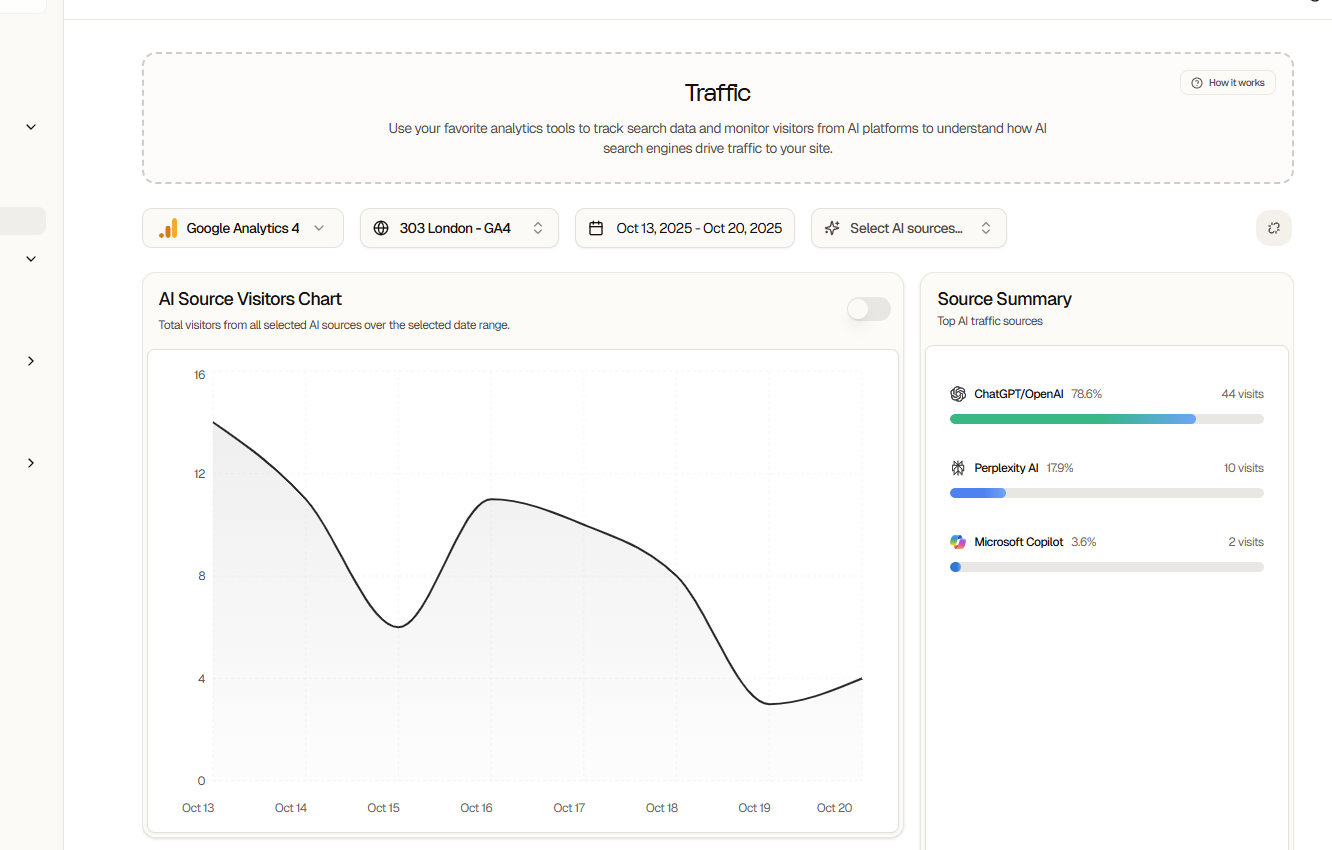
- Sessions from each AI platform
- Page views per AI source
- Average session duration
- Bounce rate by AI platform
- Conversions attributed to AI
- Revenue from AI-referred traffic
Conversion Tracking
Setting Up Goals
Define what counts as a conversion: E-commerce:- Purchases
- Add to cart
- Checkout initiated
- Revenue tracking
- Form submissions
- Email signups
- Demo requests
- Contact form fills
- Time on site > X minutes
- Pages per session > X
- Scroll depth > X%
- Video plays
AI Conversion Attribution
See which prompts drive conversions:- Direct Attribution: User converts in same session
- Assisted Conversions: AI visit assists later conversion
- Multi-Touch: AI touchpoint in longer journey
User Behavior Analysis
AI Visitor Behavior
Compare AI-referred vs. other visitors:
Insights:
- AI-referred visitors often spend more time
- Higher engagement and conversion rates
- Different page paths and interests
Content Performance
See which content attracts AI-referred visitors:- Most viewed pages
- Entry pages from AI
- Exit pages
- Content engagement
- Internal navigation patterns
Dashboard Widgets
Traffic Overview
- Total visitors
- AI vs. non-AI breakdown
- Traffic trends over time
- Platform distribution
Conversion Funnel
- Visitors → Engaged → Converted
- Drop-off points
- Conversion rates by source
- Revenue attribution
Real-Time
- Active users now
- Traffic sources (live)
- Popular pages
- Recent conversions
Audience Insights
- Demographics
- Interests
- Technology
- Geographic distribution
Data Refresh
*Google Analytics 4 has inherent data processing delays of 24-48 hours
Troubleshooting
Connection Failed
Connection Failed
Common Issues:
- Insufficient GA4 permissions
- Wrong property type (UA vs. GA4)
- Account access issues
- Verify Editor/Admin access in GA4
- Ensure using GA4 (not Universal Analytics)
- Try different Google account
- Check GA4 property is active
No Traffic Data
No Traffic Data
Possible Causes:
- Brand new property (no data yet)
- Wrong property selected
- GA4 not receiving traffic
- Filters excluding data
- Property has data in GA4 directly
- Selected correct property
- GA4 tracking code is installed
- Wait 24-48 hours for data processing
AI Traffic Not Showing
AI Traffic Not Showing
Why This Happens:
- Enhanced tracking not enabled
- AI visitors use VPNs/privacy tools
- Insufficient sample size
- Attribution window too short
- Enable enhanced tracking in integration settings
- Wait for more data (needs 100+ visitors)
- Adjust attribution window
- Verify tracking parameters are working
Privacy & Compliance
Data Handling:- Only aggregated data is stored
- No personally identifiable information
- GDPR and CCPA compliant
- User privacy respected
- Searchable respects your existing consent setup
- No additional cookies required
- Works with consent management platforms
- Pro: 90 days
- Agency: Unlimited retention
- Custom: Custom retention windows
- Can be deleted anytime
Advanced Features (Custom)
Custom Reports
Build custom dashboards:- Drag-and-drop metrics
- Custom dimensions
- Calculated fields
- Scheduled exports
Predictive Analytics
AI-powered predictions:- Conversion probability
- Churn likelihood
- Lifetime value
- Trend forecasting
Cross-Domain Tracking
Track users across multiple properties:- Main site + subdomain
- Multiple brand websites
- App + web tracking
Data Studio Integration
Export to Google Data Studio:- Pre-built templates
- Custom visualizations
- Automated reporting
- Stakeholder dashboards
Best Practices
Enable enhanced tracking for AI attribution
Set up conversion goals from day one
Monitor AI traffic weekly
Compare AI vs. organic visitor behavior
Use insights to optimize prompt strategy
Track ROI of AI visibility efforts
Use Cases
Calculate AI ROI
Optimize Content
- Identify pages with high AI traffic
- See which ones convert best
- Create similar content
- Optimize low-converting pages
Improve Prompts
- Track which prompts drive most traffic
- Measure conversion rates per prompt
- Double down on high-converters
- Refine or remove low-performers
Disconnecting GA4
To disconnect:- Settings → Integrations
- Click “Disconnect” on GA4
- Confirm disconnection
- No new data synced
- Historical data preserved (30 days)
- Can reconnect anytime
- No impact on your GA4 property
Next Steps
Google Search Console
Add GSC for complete SEO data
Content Optimization
Turn insights into better content
Score Benchmarks
Master the analytics dashboard
Visibility Tracking
Measure AI-driven performance