

What Are Prompts?
Prompts are questions or queries that you want to track across AI platforms. Think of them as the “keywords” of AI search - they help you understand when and how AI models mention your brand. While Search Engines like Google operate primarily on short phrases, or “keywords”, AI search is much more conversational in nature. While you may search for ‘best running sneakers’ on Google, AI search will provide better answers for queries such as ‘best road running sneakers on a budget, ideally waterproof’.Why Prompts Matter
The AI Search Shift
Users are increasingly asking AI assistants for recommendations:- “What’s the best CRM for small businesses?”
- “How do I optimize my website for SEO?”
- “How can I introduce more colours to my decor?”
What We Track
Searchable monitors your prompts across major AI platforms:OpenAI
ChatGPT
Anthropic
Claude (Opus, Sonnet, Haiku)
Gemini (Pro, Ultra)
Perplexity
Perplexity AI
Coming Soon
xAI Grok, DeepSeek, Meta Llama
Creating Effective Prompts
Prompt Anatomy
A great prompt has three components:- Context: Who is asking and what’s their situation?
- Intent: What information are they seeking?
- Specificity: Enough detail to generate useful responses
Good vs. Bad Prompts
- Bad: Too vague, will generate generic lists
- Good: Specific context, clear intent, qualified criteria
Prompt Templates by Industry
- SaaS
- E-commerce
- Services
- Content/Media
Product ComparisonProblem-SolutionFeature Inquiry
Prompt Strategy
The Prompt Pyramid
Build your prompt library strategically:1
Foundation: Brand Queries (5-10 prompts)
Direct mentions of your brand nameExamples:
- “What is [Your Brand]?”
- “Tell me about [Your Company]”
- “How does [Your Product] work?”
2
Middle: Category Queries (10-20 prompts)
Your product/service category without brand nameExamples:
- “What are the best [category] for [audience]?”
- “How do I choose a [category]?”
- “What features should I look for in [category]?”
3
Top: Problem/Solution Queries (20-50 prompts)
Problems your product solves, without mentioning solutionsExamples:
- “How can I [achieve goal]?”
- “What’s the best way to [solve problem]?”
- “I’m struggling with [pain point], what should I do?”
4
Peak: Adjacent Topics (10-30 prompts)
Related topics where your brand adds valueExamples:
- “What is [related concept]?”
- “How do [adjacent process] work?”
- “Best practices for [related activity]?”
Prompt Diversity
Balance your prompts across dimensions:Managing Your Prompt Library
In the Searchable Dashboard
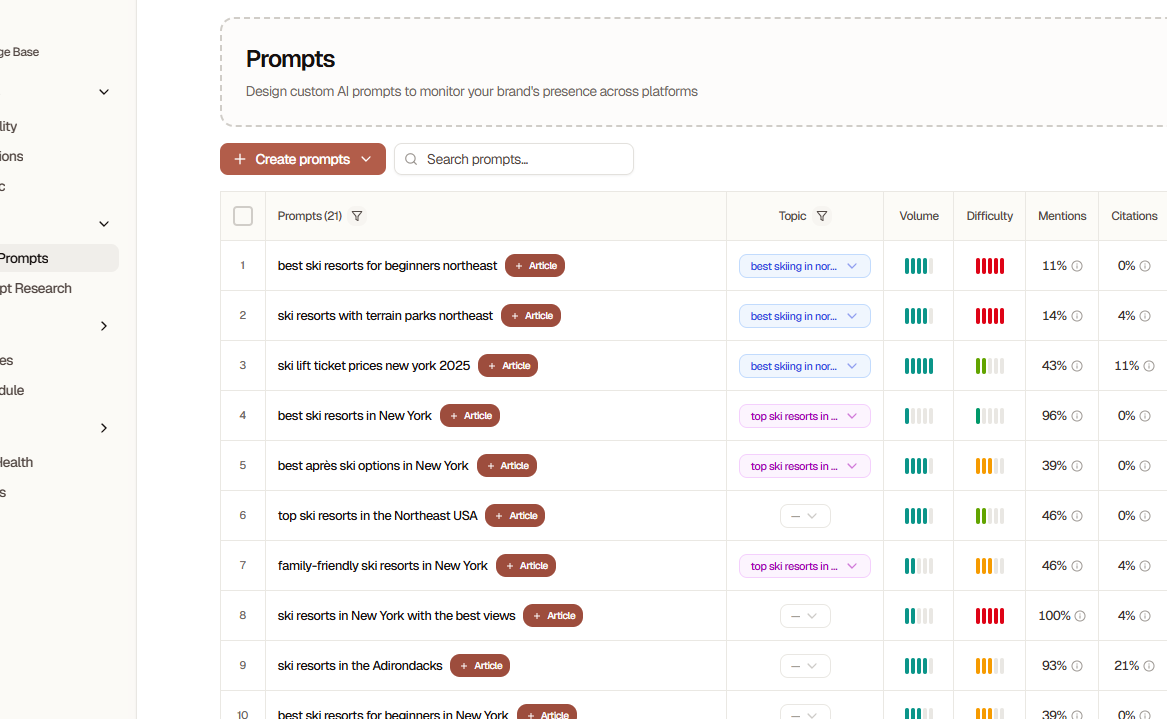
- Create new prompts
- Edit existing prompts
- Archive low-performing prompts
- Bulk import/export
- Analyze performance
- View mention history
Creating a Prompt
1
Navigate to Prompts
Go to Prompts tab in your project
2
Click Create Prompt
Click the ”+ New Prompt” button
3
Enter Your Question
Type your prompt exactly as a user would ask it
4
Add Metadata (Optional)
- Category: Organize prompts by type
- Priority: Mark important prompts
- Tags: Add labels for filtering
5
Save and Run
Click “Save & Run” to immediately test across all AI platforms
Initial results appear within 30-60 seconds. Historical tracking begins immediately.
Bulk Import
For adding many prompts at once:-
Download Template
- Go to Prompts → Import
- Download the CSV template
-
Fill Template
- One prompt per row
- Include category and tags columns
- Maximum 1000 prompts per import
- Upload & Review
- Upload your CSV file
- Review detected prompts
- Fix any errors
- Click “Import All”
Prompt Templates
Save time with pre-built templates: Access Templates:- Go to Prompts → Templates
- Browse by industry or use case
- Click “Use Template”
- Customize for your brand
- SaaS Product Queries
- E-commerce Product Recommendations
- Service Provider Selection
- Content Discovery
- Local Business Queries
- B2B Software Evaluation
Analyzing Prompt Performance
Key Metrics
Mention Rate
How often your brand appears in responses
Average Position
Where you rank when mentioned (1-10)
Share of Voice
Your mentions vs. total category mentions
Sentiment
Positive, neutral, or negative mentions
Interpreting Results
High Performers (80%+ mention rate)- Great! These prompts consistently mention your brand
- Action: Create similar prompts to expand this success
- Promising opportunities for improvement
- Action: Optimize content to better match these prompts
- Either too competitive or need better content alignment
- Action: Create targeted content or refine prompt wording
- Not necessarily bad - could be opportunity queries
- Action: Create comprehensive content specifically for these prompts
Prompt Optimization Cycle
1
Run for 2 Weeks
Let prompts collect data across multiple AI platforms
2
Analyze Patterns
Identify which prompts generate mentions and which don’t
3
Create Content
Write articles targeting zero-mention prompts
4
Optimize Existing
Improve pages that get partial mentions to increase frequency
5
Add Variations
Create new prompts based on what’s working
6
Repeat Monthly
Continuous optimization is key to AI visibility
Advanced Prompt Techniques
Competitor Tracking
Include competitors in your prompts to understand your position: Comparison Prompts:Sentiment Analysis
Track not just mentions, but how you’re mentioned:- Monitor positive vs. negative sentiment
- Identify common criticisms
- Track feature-specific sentiment
- Compare sentiment to competitors
Time-Based Prompts
Some prompts are seasonal or time-sensitive: Examples:- Create year-specific prompts
- Update annually
- Archive outdated versions
Local Prompts
For location-based businesses: Examples:Prompt Best Practices
Start with 10-20 prompts and expand gradually
Test prompts in ChatGPT before adding to Searchable
Focus on questions your customers actually ask
Include competitor names strategically
Update prompts quarterly to stay current
Archive low-performing prompts after 3 months
Create content specifically targeting zero-mention prompts
Industry-Specific Strategies
SaaS
- Focus heavily on feature comparison prompts
- Track integration-related queries
- Monitor pricing and plan comparisons
- Include use-case specific prompts
E-commerce
- Product recommendation prompts
- Price-point specific queries
- Alternative and comparison prompts
- Seasonal buying queries
Services
- Problem-solution prompts
- Qualification and vetting questions
- Local service queries
- Industry-specific how-to prompts
Content/Publishing
- Resource discovery prompts
- Learning and education queries
- “Best of” list prompts
- Tutorial and guide requests
Frequently Asked Questions
How many prompts should I have?
How many prompts should I have?
- Start with 10-20 prompts and expand based on performance
- Most businesses find 50-200 prompts sufficient for comprehensive coverage
- Quality matters more than quantity - focus on prompts your customers actually ask
How often should I update my prompts?
How often should I update my prompts?
- Add new prompts: Monthly
- Review performance: Weekly
- Update existing prompts: Quarterly
- Archive low performers: Every 3 months
Can prompts be too specific?
Can prompts be too specific?
Yes! Overly specific prompts (e.g., “Tell me everything about [Your Brand]‘s exact feature set”) won’t reflect real user queries. Balance specificity with natural language.
Why are my prompts showing zero mentions?
Why are my prompts showing zero mentions?
Common reasons:
- Your brand isn’t well-known enough yet
- No content specifically answers that prompt
- The prompt is too competitive
- AI models lack training data about your brand
Should I include competitor names in prompts?
Should I include competitor names in prompts?
Yes, strategically! Including competitors helps you:
- Understand your competitive position
- Identify where you’re being compared
- Find alternative-seeking queries
How do I track prompts in different languages?
How do I track prompts in different languages?
Custom plans support multi-language prompts. Contact sales for:
- Language-specific prompt libraries
- Region-specific AI model tracking
- International brand visibility monitoring
Prompt Library Resources
Browse Templates
Industry-specific prompt templates
Explore Prompts
AI-powered prompt suggestions
Join Our Slack
Connect with other users and share prompts
Next Steps
Run Your First Prompt
Create your first prompt now
AI Visibility Tracking
Learn to interpret visibility reports
Content Generation
Create content that gets AI citations
Advanced Prompt Techniques
Master advanced prompt strategies