

Overview
Connecting Google Search Console (GSC) to Searchable unlocks powerful insights by combining traditional SEO data with AI visibility metrics. See which keywords drive both Google rankings and AI mentions.GSC integration is available on Professional, Agency, and Custom plans.
Benefits
Keyword Insights
See which keywords perform in both Google and AI platforms
Traffic Correlation
Understand how SEO and AEO work together
Technical Issues
Identify crawl errors and indexing problems
Performance Tracking
Monitor impressions, clicks, CTR, and position
What Data Gets Synced
- Keywords: Queries, impressions, clicks, CTR, average position
- Pages: Top performing pages and their metrics
- Countries: Geographic performance data
- Devices: Desktop, mobile, tablet breakdown
- Search Appearance: Rich results, AMP, etc.
- Coverage: Indexing status and errors
- Core Web Vitals: Performance metrics
- Mobile Usability: Mobile-specific issues
Prerequisites
Before connecting GSC to Searchable:Have a verified Google Search Console property for your domain
Owner or Full User permission in GSC (not just Restricted access)
At least 28 days of data in GSC (for meaningful analysis)
Searchable Professional, Agency, or Custom plan
Setup Guide
1
Navigate to Integrations
In your Searchable project:
- Go to Settings
- Click Integrations
- Find Google Search Console
- Click Connect
2
Authenticate with Google
A popup window opens:
- Select your Google account
- Review permissions requested
- Click Allow
- View Search Console data
- View and manage your properties
Searchable only reads data - we never modify your GSC settings or data.
3
Select Property
Choose the GSC property to connect:Property Types:
- Domain property: Recommended (covers all subdomains and protocols)
- URL prefix: Only covers specific protocol and subdomain
4
Configure Sync Settings
Set your preferences:Sync Frequency:
- Hourly (recommended for most users)
- Daily (for large sites to reduce API usage)
- Manual (sync on-demand only)
- Last 7 days
- Last 28 days (recommended)
- Last 90 days (maximum)
- Include/exclude specific queries
- Country filters
- Device type filters
5
Run Initial Sync
Click “Start Initial Sync”
- First sync takes 2-5 minutes
- You’ll receive an email when complete
- Data appears in Analytics tab
Initial sync imports the full date range. Subsequent syncs only import new data.
6
Verify Connection
Confirm everything is working:
- Go to Analytics tab
- Look for GSC data widgets
- Check “Last Synced” timestamp
- Verify data looks accurate
Using GSC Data in Searchable
Keyword Analysis
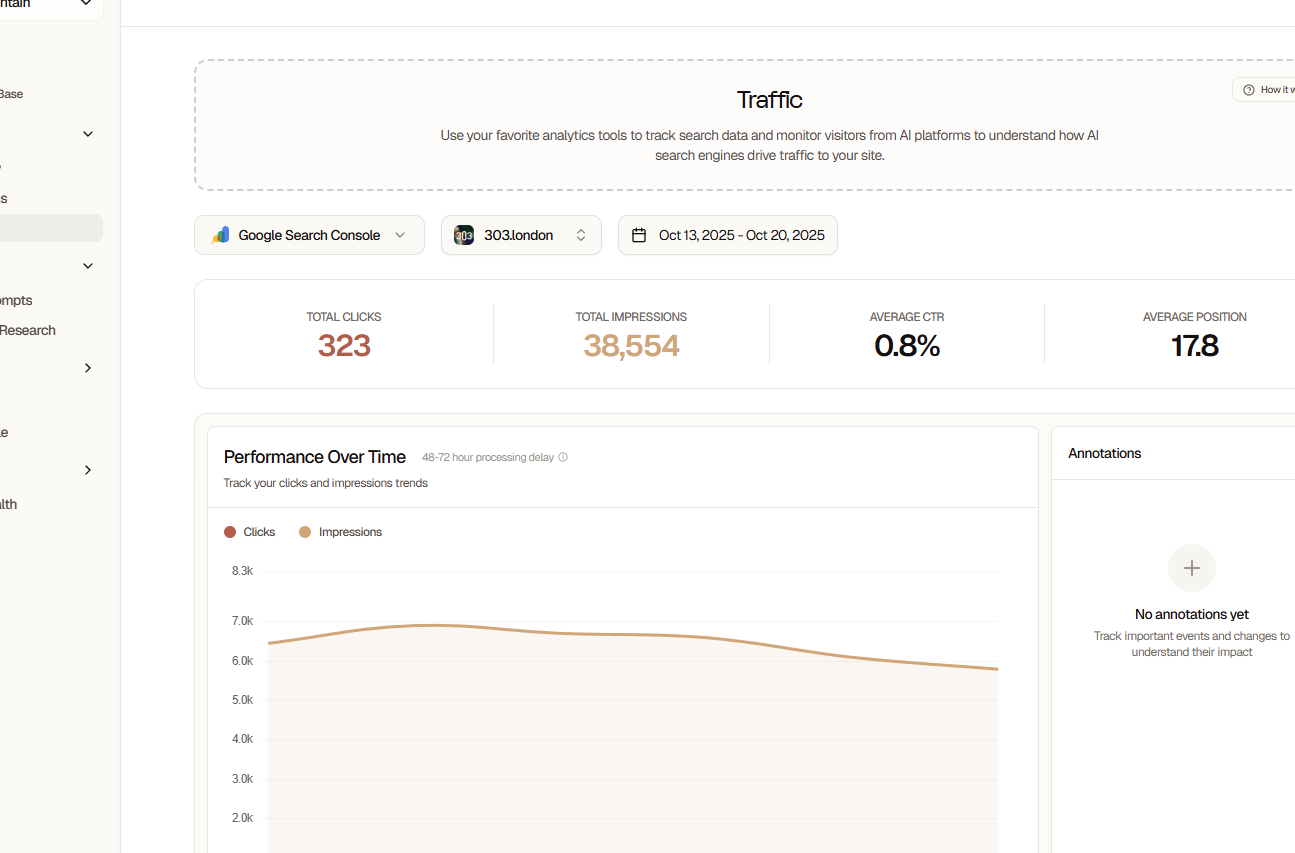
- See which keywords rank in Google AND get AI mentions
- Identify high-potential keywords with good SEO but no AI presence
- Find keywords where AI visibility exceeds Google rankings
- Keywords with high impressions but low AI visibility
- Keywords ranking well in AI but not in Google
- High-CTR keywords to target with content
Page Performance
Metrics per Page:- Google impressions and clicks
- AI mention frequency
- Combined visibility score
- Traffic sources breakdown
- Which pages drive most organic traffic
- Which pages get AI citations
- Content gaps and opportunities
- Pages needing optimization
Search Analytics
Filters and Segmentation:- By date range
- By device (mobile, desktop, tablet)
- By country
- By search appearance
- By query type
- CSV download of all data
- Custom reports
- Scheduled email reports
Data Refresh Schedule
Google Search Console data has a 2-3 day delay from Google. This is a GSC limitation, not Searchable.
Understanding the Combined Dashboard
SEO + AEO Correlation
High SEO, High AEO (Top Right Quadrant)- Your best performing content
- Maintain and expand on these topics
- Use as templates for new content
- Good traditional SEO but AI models don’t cite you
- Opportunity: Optimize for AI visibility
- Add structured data, improve answer formats
- AI models cite you but Google rank is low
- Opportunity: Improve traditional SEO
- Build backlinks, optimize technical SEO
- Content needs comprehensive optimization
- Consider rewriting or consolidating
- May not be worth the effort vs. creating new content
Traffic Attribution
See how traffic sources contribute:Troubleshooting
Connection Failed
Connection Failed
Common Causes:
- Insufficient GSC permissions
- Account not verified in GSC
- Using personal vs. organizational account
- Verify you have Owner or Full User access
- Check property is verified in GSC
- Try using a different Google account
- Clear browser cookies and retry
No Data Showing
No Data Showing
Possible Reasons:
- Recently created property (needs 28 days of data)
- Wrong property selected
- Filters excluding all data
- Sync hasn’t completed yet
- Property has data in GSC directly
- Selected correct property in Searchable
- Sync status shows “Connected”
- Last sync timestamp is recent
Sync Errors
Sync Errors
Error Messages:
- “Rate limit exceeded”: Wait 1 hour, then retry
- “Property not found”: Re-verify property ownership in GSC
- “Authentication expired”: Disconnect and reconnect
- “Insufficient permissions”: Check GSC access level
- Disconnecting integration
- Clearing browser cache
- Reconnecting with fresh authentication
Data Doesn't Match GSC
Data Doesn't Match GSC
Why Data May Differ:
- Time zone differences
- Date range selection
- Filters applied in Searchable
- GSC data still processing
- Different aggregation methods
- Verify same date range in both platforms
- Check timezone settings match
- Remove any active filters
- Allow 24 hours for data to fully sync
Privacy & Data Handling
What Searchable Stores:- Keyword and page performance metrics
- Aggregated statistics only
- No personally identifiable information
- No individual search query data
- Pro: 90 days of historical data
- Agency: Unlimited retention
- Custom: Custom retention windows
- Disconnect integration to stop new data sync
- Historical data deleted after 30 days
- Immediate deletion available on request
Advanced Features
Custom Dimensions (Custom)
Create custom segments:- By branded vs. non-branded keywords
- By commercial intent
- By content type
- By funnel stage
Automated Alerts
Get notified when:- Ranking drops significantly
- New high-volume keywords discovered
- CTR falls below threshold
- Impressions surge or drop
API Access
Query GSC data via Searchable API:Best Practices
Sync at least 28 days of data for reliable trends
Review GSC insights weekly alongside AI visibility data
Use keyword gaps to inform content strategy
Monitor both SEO and AEO for complete picture
Set up alerts for significant ranking changes
Export data monthly for stakeholder reports
GSC + Searchable Use Cases
Content Gap Analysis
- Identify keywords with high impressions, low clicks
- Check if AI models cite you for those keywords
- If yes: Optimize for Google (improve title, meta, CTR)
- If no: Create better content that answers the query
Competitive Research
- Find keywords where you rank on page 2-3
- Check if competitors get AI citations
- Create superior content optimized for both
- Track progress in unified dashboard
ROI Measurement
- Track organic traffic from GSC
- Measure AI-referred traffic
- Calculate conversion rates for each
- Determine which channel drives more value
Disconnecting GSC
To disconnect Google Search Console:- Go to Settings → Integrations
- Find Google Search Console
- Click “Disconnect”
- Confirm disconnect
- No new data is synced
- Historical data preserved for 30 days
- Can reconnect anytime
- No impact on your actual GSC account
Next Steps
Google Analytics 4
Add GA4 for complete traffic insights
Keyword Strategy
Optimize your keyword approach
Score Benchmarks
Master the analytics dashboard
API Documentation
Access data programmatically