

Overview
Searchable’s audit system performs deep analysis of your website to identify technical SEO issues, content quality problems, and AEO optimization opportunities. Get actionable recommendations prioritized by impact.Technical Audit
Performance, speed, and technical SEO
Content Audit
Content quality and optimization
AEO Audit
AI readiness and structured data
Audit Types
Quick Audit (30 seconds)
Fast scan of critical issues:- Core Web Vitals check
- Major technical errors
- Critical content gaps
- Priority recommendations
- Quick health checks
- Pre-launch reviews
- Post-update validation
Comprehensive Audit (2-10 minutes)
Deep analysis of all pages:- Full technical SEO audit
- Content quality analysis
- AEO optimization review
- Competitive benchmarking
- Historical comparison
- Monthly reviews
- Strategy planning
- Identifying opportunities
Continuous Monitoring
Automated ongoing audits:- Catch issues immediately
- Track improvement trends
- Alert on regressions
- Flexible audit scheduling
Number of pages monitored continuously varies depending on your plan.
Running an Audit
Run Audit Now
Start auditing your site
1
Navigate to Audits
Go to your project dashboard → Run Audit button
2
Select Audit Type
Choose quick or comprehensive based on your needs
3
Configure Scope
- All pages or specific URLs
- Include/exclude sections
- Mobile or desktop analysis
4
Start Audit
Click “Start Audit” and wait for completion. Most finish in 2-10 minutes.
5
Review Results
See prioritized issues and recommendations
Understanding Audit Results
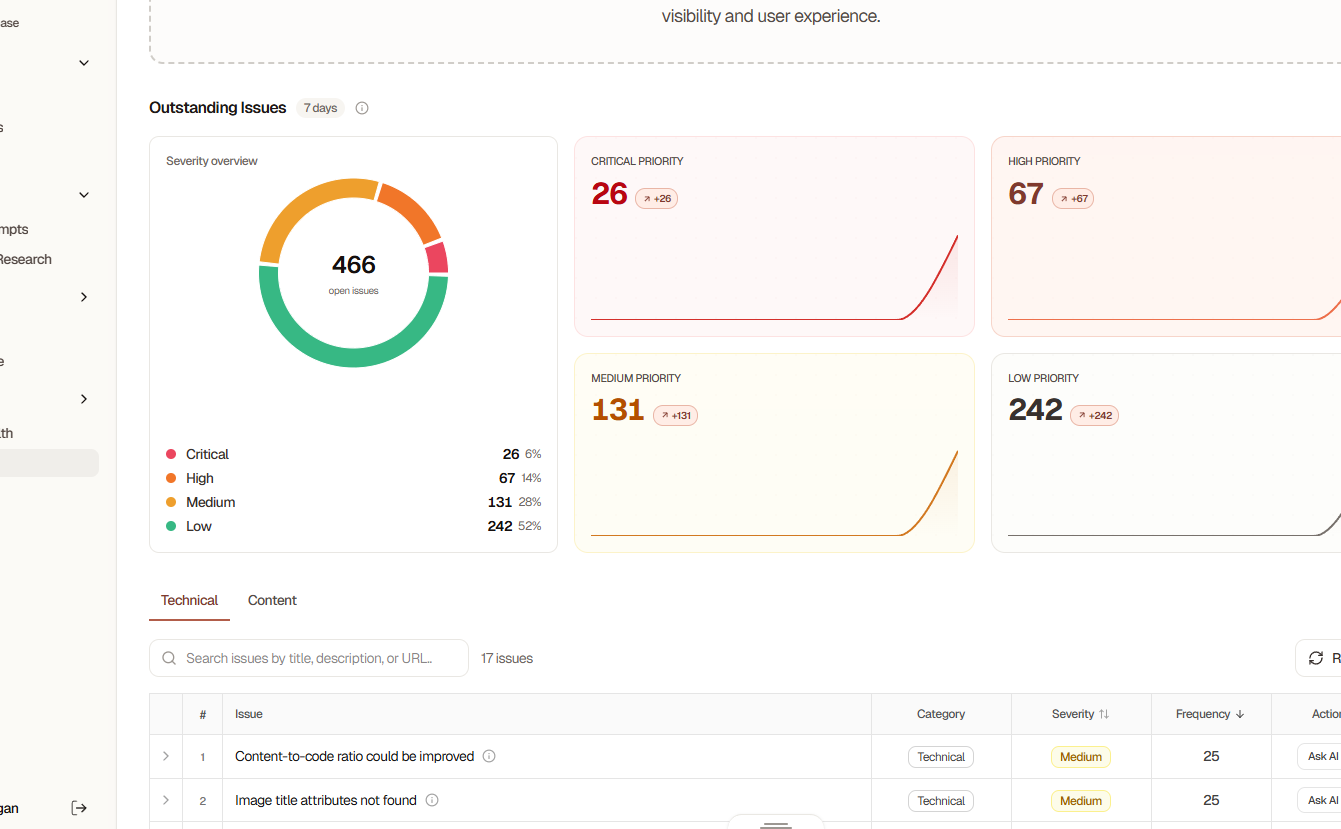
Issue Severity Levels
Critical (Red)- Severe problems impacting site function
- Major SEO penalties
- Broken core functionality
- Security vulnerabilities
- Significant impact on rankings
- Poor user experience
- Major performance issues
- Missing critical content
- Moderate optimization opportunities
- Minor technical issues
- Content improvements needed
- Best practice violations
- Nice-to-have optimizations
- Minor improvements
- Future-proofing recommendations
- Advanced optimizations
Common Issues Found
Technical Issues
Page Speed Problems
Page Speed Problems
- Large image files
- Unoptimized JavaScript
- Render-blocking resources
- Slow server response
- Missing compression
Mobile Usability
Mobile Usability
- Text too small
- Touch targets too close
- Content wider than screen
- Incompatible plugins
Crawl Errors
Crawl Errors
- 404 pages
- Redirect chains
- Broken internal links
- Blocked resources
- Invalid XML sitemap
HTTPS Issues
HTTPS Issues
- Mixed content warnings
- Invalid SSL certificate
- HTTP version still accessible
- Insecure resources
Content Issues
Thin Content
Thin Content
- Pages with less than 300 words
- Duplicate content
- Low-value pages
- Missing key information
Missing Meta Data
Missing Meta Data
- No title tags
- Missing meta descriptions
- Duplicate titles/descriptions
- Too long or too short
Poor Content Structure
Poor Content Structure
- Missing H1 tags
- Incorrect heading hierarchy
- No internal links
- Long paragraphs
Keyword Issues
Keyword Issues
- No target keywords
- Keyword cannibalization
- Over-optimization
- Irrelevant keywords
AEO Issues
Missing Structured Data
Missing Structured Data
- No schema markup
- Incomplete schemas
- Invalid JSON-LD
- Missing entities
Poor Answer Format
Poor Answer Format
- No direct answers
- Unclear explanations
- Missing definitions
- Lack of examples
Issue Prioritization
Searchable automatically prioritizes fixes by:- Impact Score: How much it affects your scores
- Effort Level: Easy, medium, or hard to fix
- Page Importance: Based on traffic and conversions
- Issue Frequency: How many pages are affected
Quick Wins
Filter for high-impact, low-effort fixes:- Missing alt text
- Broken internal links
- Missing meta descriptions
- Duplicate content
- Image optimization
Long-Term Projects
High-impact but time-intensive:- Site-wide redesign
- Content rewrite projects
- Technical infrastructure changes
- Structured data implementation
Taking Action on Issues
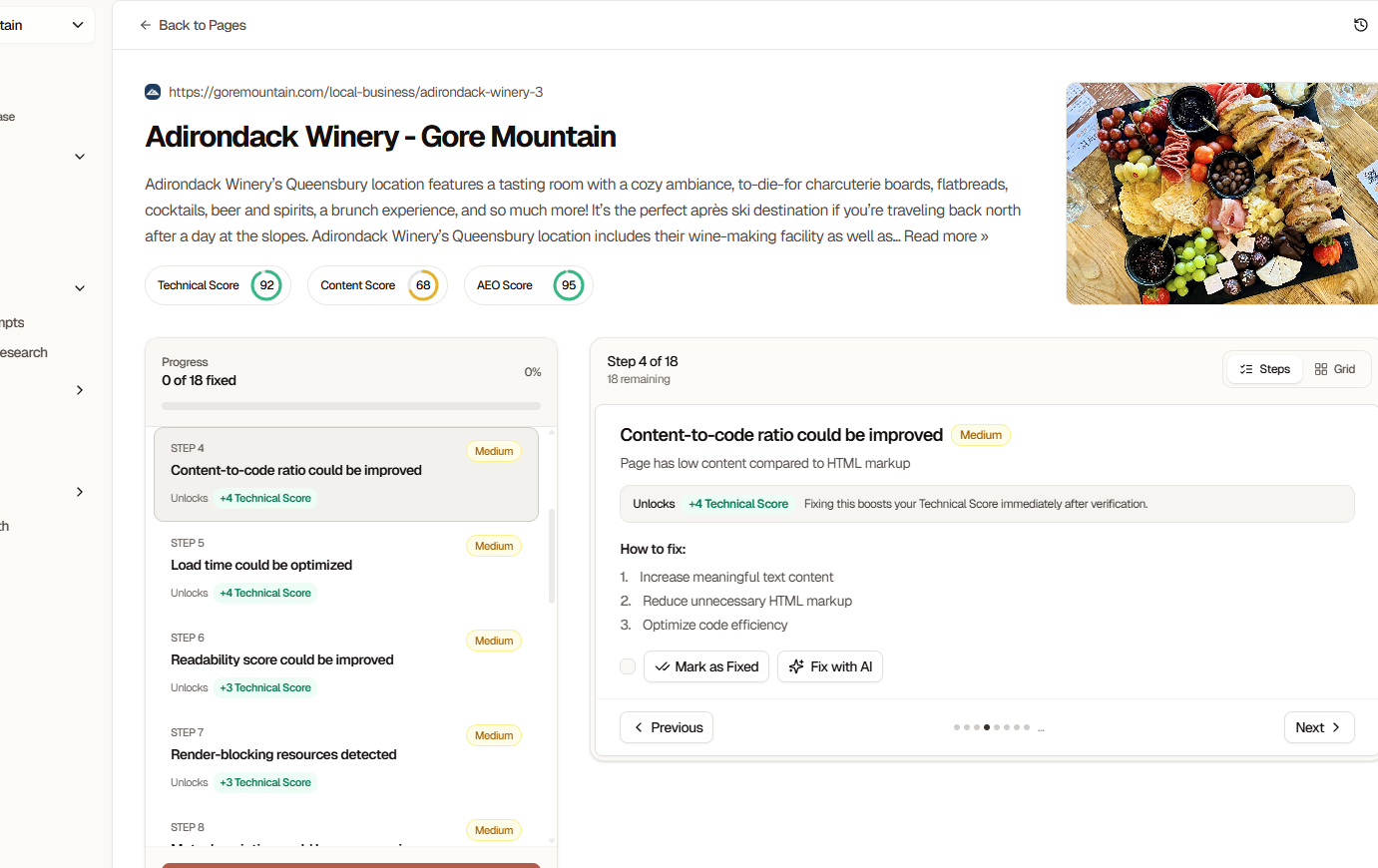
For Each Issue
View Details:- Issue description
- Why it matters
- Affected pages
- How to fix
- Code examples
- Expected impact
- Mark as “In Progress”
- Assign to team member
- Add notes
- Set deadline
- Mark as “Resolved”
Bulk Actions
For issues affecting multiple pages:- Export affected URLs
- Apply fixes in bulk
- Track progress
- Re-audit to verify
Re-Auditing After Fixes
1
Fix Issues
Implement recommendations from audit
2
Wait for Changes
Allow 24-48 hours for changes to propagate
3
Run New Audit
Compare before and after results
4
Verify Improvements
Check that scores increased and issues resolved
Best Practices
Run audits after any major site changes
Fix critical issues immediately
Tackle high-impact quick wins first
Set aside time monthly for audits
Track progress with historical comparison
Re-audit after implementing fixes
Monitor automated audits for regressions
Integration Benefits
With Google Search Console
- Correlate audit findings with search data
- Prioritize based on traffic impact
- Track keyword-specific improvements
With Google Analytics
- Identify high-traffic pages needing fixes
- Measure conversion impact
- Prioritize by business value
With CMS
- Direct fix implementation
- Content update workflows
- Publishing optimization
Common Questions
How long does an audit take?
How long does an audit take?
- Quick audit: 30-60 seconds
- Comprehensive audit: 2-10 minutes
- Time varies based on site size and complexity
Will audits slow down my site?
Will audits slow down my site?
No. Searchable’s crawler is rate-limited and respects your server resources. We won’t impact your site’s performance for real users.
Can I audit sites I don't own?
Can I audit sites I don't own?
You can audit any public website, but detailed tracking features require domain verification on Professional, Agency, or Custom plans.
How often should I run audits?
How often should I run audits?
- After site changes: Immediately
- Regular monitoring: Weekly (Starter) or Daily (Professional+)
- Strategic reviews: Monthly comprehensive audits
Can I export audits as a report?
Can I export audits as a report?
This feature is coming soon. If you’d like to know more, reach out to us on Community Slack.
Next Steps
Run Your First Audit
Start auditing your site now
Understanding Scores
Learn what affects your scores
Troubleshooting
Detailed fix instructions
Troubleshooting
Common audit problems